Rename a SecureSheet
Administrators may change the name of any SecureSheet in any area of your organization’s SecureSheet site and at any time.
Renaming a SecureSheet
- Login to SecureSheet.
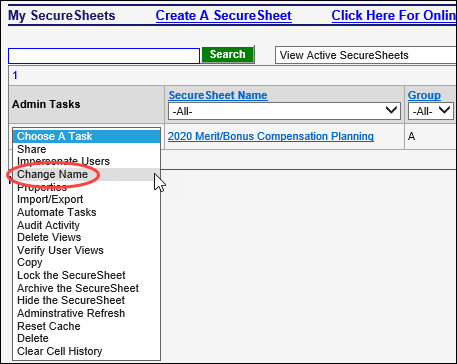
- Select Change Name from the Admin Tasks drop-down next to the SecureSheet you want to rename.
- Update the Name properties as desired:
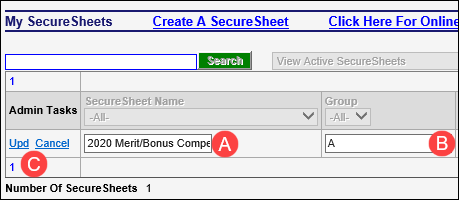
- A. Change the SecureSheet Name.
- B. Enter/update the Group. Group helps to organize SecureSheets that are used for the same project.
- For example, group your compensation SecureSheet and the Users-Views SecureSheet for your Merit cycle with a “Merit” group name, and group your bonus SecureSheet and the Users-Views SecureSheet for your Bonus cycle with a “Bonus” group name.
- C. Click Upd to save your changes.